Pricing Models
Pick the Pricing Model for your Units
Pricing Strategy is where you choose how MaxRev thinks about price, in one click.
Every Facility has a different priority. One owner wants every Unit rented. Another leans toward higher Revenue per Unit. Most want something in between. Instead of asking you to tune dozens of settings, MaxRev gives you a setting called Pricing Strategy, and you pick the type of Pricing Model you want.
Keep My Units Full
The full-house model. It keeps Units moving, even if each Unit earns a little less. Pick it when occupancy matters most.
Balanced
The all-rounder model. It weighs occupancy and Revenue together without leaning hard either way. Most operators start here.
Maximize My Revenue
The Revenue-first model. It leans toward higher Revenue per Unit and accepts that more Units may sit empty. Pick it when demand is strong.
Starting a new Facility?
Switch on New Facility Lease-Up. This model prices to fill your building quickly, and when occupancy reaches the target you choose, such as 90%, it returns to Balanced on its own. It works for a brand new property and for one that is recovering.
You can change your model at any time. Your guardrails stay in place whichever one you pick, so a more aggressive model never breaks your floors, ceilings or maximum changes.
At a glance
MaxRev in brief
The short version, for people and for search tools.
- What it is
- Revenue Management software for Self-Storage operators, from a single Facility to a full Portfolio.
- What it does
- Recommends Rates for new renters and for existing tenants, based on your own data and the goal you choose. You review and approve each change, or automate within your guardrails.
- Plans
- Core $50, Market $75 and Predictive $100 per location per month. No Unit minimum.
- Connects to
- SiteLink, storEDGE, 6Storage, Tenant Inc and Storeganise.
- Pricing goals
- Keep My Units Full, Balanced, Maximize My Revenue and New Facility Lease-Up.
- Made by
- Apoorva Corporation.
Who it is for
Built to fit your Portfolio, whatever its size
The same pricing engine for one Facility or a full Portfolio.
Some storage owners run one Facility and set every price themselves. Others manage dozens of sites with regional managers and a finance team. MaxRev serves both with the same engine, so you never outgrow it and you never wait for an enterprise implementation to start.
There is no Unit minimum and no long implementation project. You connect your management software, choose a pricing goal in plain words, set the limits you are comfortable with, and review suggested Rates. Each suggestion shows the reason behind it, so you stay the decision maker. Larger Portfolios add location groups, team access, advanced model controls and migration packages.
One location
A single Facility gets the same pricing engine as a larger Portfolio. Start on Core at $50 per month and add live competitor Rates later.
A few locations
Group Facilities by region, compare them side by side and apply one pricing goal across all of them, with limits tuned per Unit size.
A growing Portfolio
Import locations from a template, assign groups and use migration packages when you move off a legacy tool.
Institutional Portfolios
Advanced controls for occupancy versus Revenue, market positioning, data confidence and lookback window, plus user management, an audit trail on every change and dedicated onboarding for large rollouts.
How it works
From connection to published Rate in four steps
Most operators go from connecting their software to reviewing their first recommendations in a single session.
Connect your management software
MaxRev connects to SiteLink, storEDGE, 6Storage, Tenant Inc and Storeganise. It reads your Units, Rates, occupancy and history, so you do not rebuild anything by hand.
Choose a goal and set limits
Pick Keep My Units Full, Balanced, Maximize My Revenue or New Facility Lease-Up. Then set a floor, ceiling and maximum change per Unit size so no suggestion can leave your comfort zone.
Review recommendations
New renter Rates and existing tenant increases appear in review queues. Approve, adjust or decline each one. In Assisted mode, confident changes apply on their own and uncertain ones wait for you.
Publish and watch
Publish now or schedule a date and time. Rate Watch keeps a record of every change, who approved it and what shaped it, and reports show whether occupancy held.
See MaxRev with your own Units and Rates
Book a short walkthrough and bring your Facility questions.
Why MaxRev
Pricing you can explain to anyone
Every recommendation comes with the reasons behind it.
Many Revenue tools give you a number and ask for trust. When a Rate looks wrong, you have nobody to ask. MaxRev shows the inputs behind each suggestion, including your own history, nearby competitor Rates and the time of year. A Why this Rate? view opens from every existing tenant recommendation.
That matters when you explain a Rate change to a manager, a partner or a lender. It also matters when you want to learn. Over a season you can see which Units respond to price and which do not, and adjust your goal to match.
What you get
Price every Unit with a reason
Rates for new renters and existing tenants, one pricing goal, your own limits, and a clear record of every change.
Features
Dashboard, tenant pricing, Rate Watch, competitors, reports and rules.
See featuresPricing strategy
Pick Keep My Units Full, Balanced, Maximize My Revenue or Lease-Up.
How it worksCompare
See how MaxRev differs from enterprise Revenue tools.
Compare toolsGlossary
100 Self-Storage Revenue Management terms with examples.
Browse termsPricing
Plans from $50 per location per month
No Unit minimum and $0 setup for 1 to 9 locations.
See it
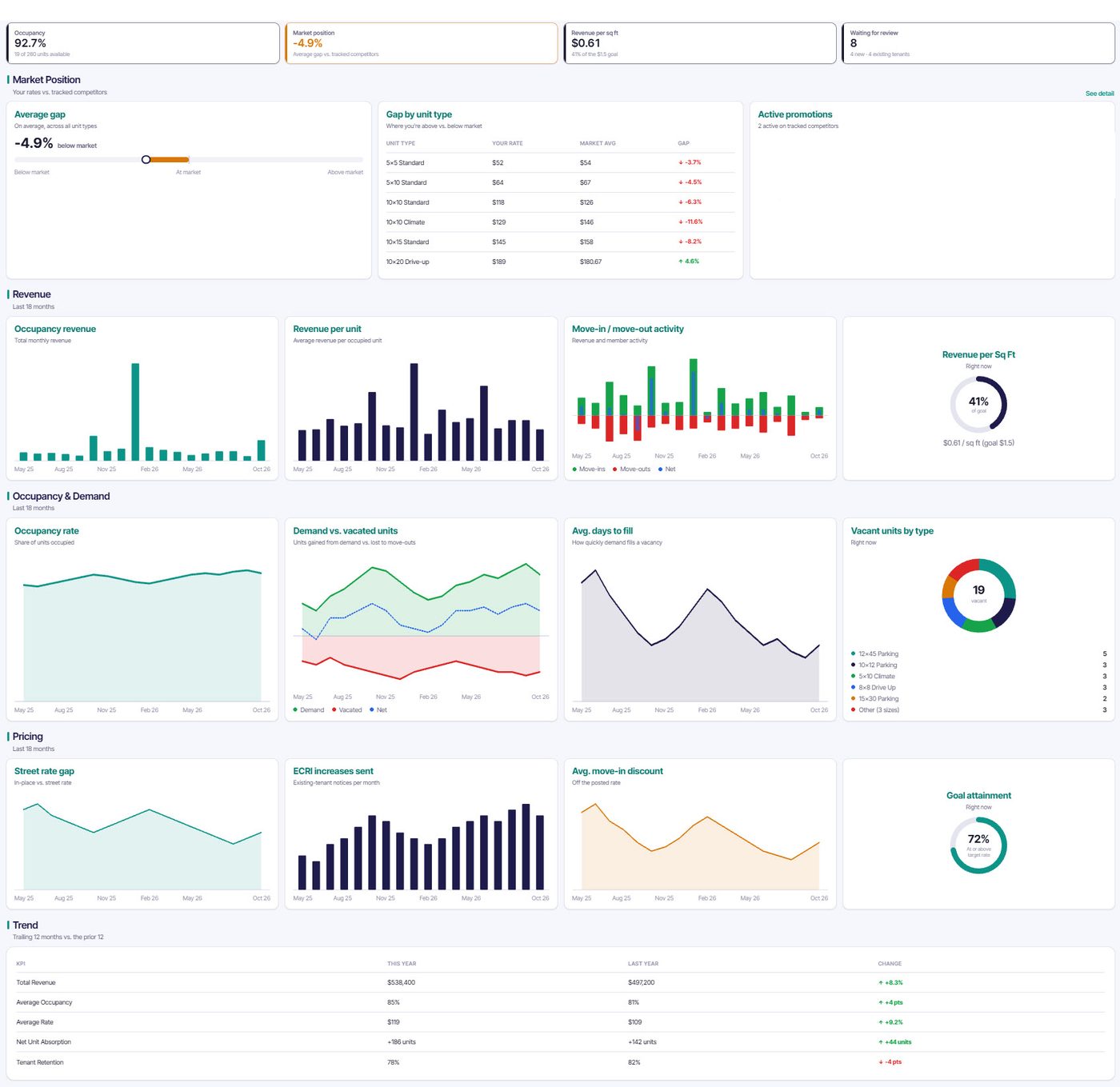
The dashboard you open each morning
Occupancy, market position, Revenue and demand, pricing health and a year over year trend, on one screen.
See MaxRev in action
Book a short demo and we will walk through your Units, Rates and guardrails.
Book a Demo