Pricing Models
Pick the Pricing Model for your Units
Pricing Strategy is where you choose how MaxRev thinks about price, in one click.
Every Facility has a different priority. One owner wants every Unit rented. Another leans toward higher Revenue per Unit. Most want something in between. Instead of asking you to tune dozens of settings, MaxRev gives you a setting called Pricing Strategy, and you pick the type of Pricing Model you want.
Keep My Units Full
The full-house model. It keeps Units moving, even if each Unit earns a little less. Pick it when occupancy matters most.
Balanced
The all-rounder model. It weighs occupancy and Revenue together without leaning hard either way. Most operators start here.
Maximize My Revenue
The Revenue-first model. It leans toward higher Revenue per Unit and accepts that more Units may sit empty. Pick it when demand is strong.
Starting a new Facility?
Switch on New Facility Lease-Up. This model prices to fill your building quickly, and when occupancy reaches the target you choose, such as 90%, it returns to Balanced on its own. It works for a brand new property and for one that is recovering.
You can change your model at any time. Your guardrails stay in place whichever one you pick, so a more aggressive model never breaks your floors, ceilings or maximum changes.
The idea
One pricing engine, not a pile of separate tools
A single model per Unit type, aimed at the goal you choose.
MaxRev builds a single pricing model for each Unit type. It uses your Facility's own Rate history, seasonal patterns and, on Market and Predictive plans, nearby competitor Rates and demand signals. It then recommends the Rate that fits the goal you choose, within your guardrails.
That is different from a system that runs several separate opinions and averages them. One model with one objective is easier to explain. You can say what the system is trying to do, and you can see why a Rate moved.
When a Unit type is new, or does not have much history of its own, MaxRev leans on data from your other locations when you have them, or on comparable Facilities in an anonymized network benchmark when you do not. The recommendation still holds up, and it leans back on your own Facility's data as that data accumulates.
The four settings
Each model in more detail
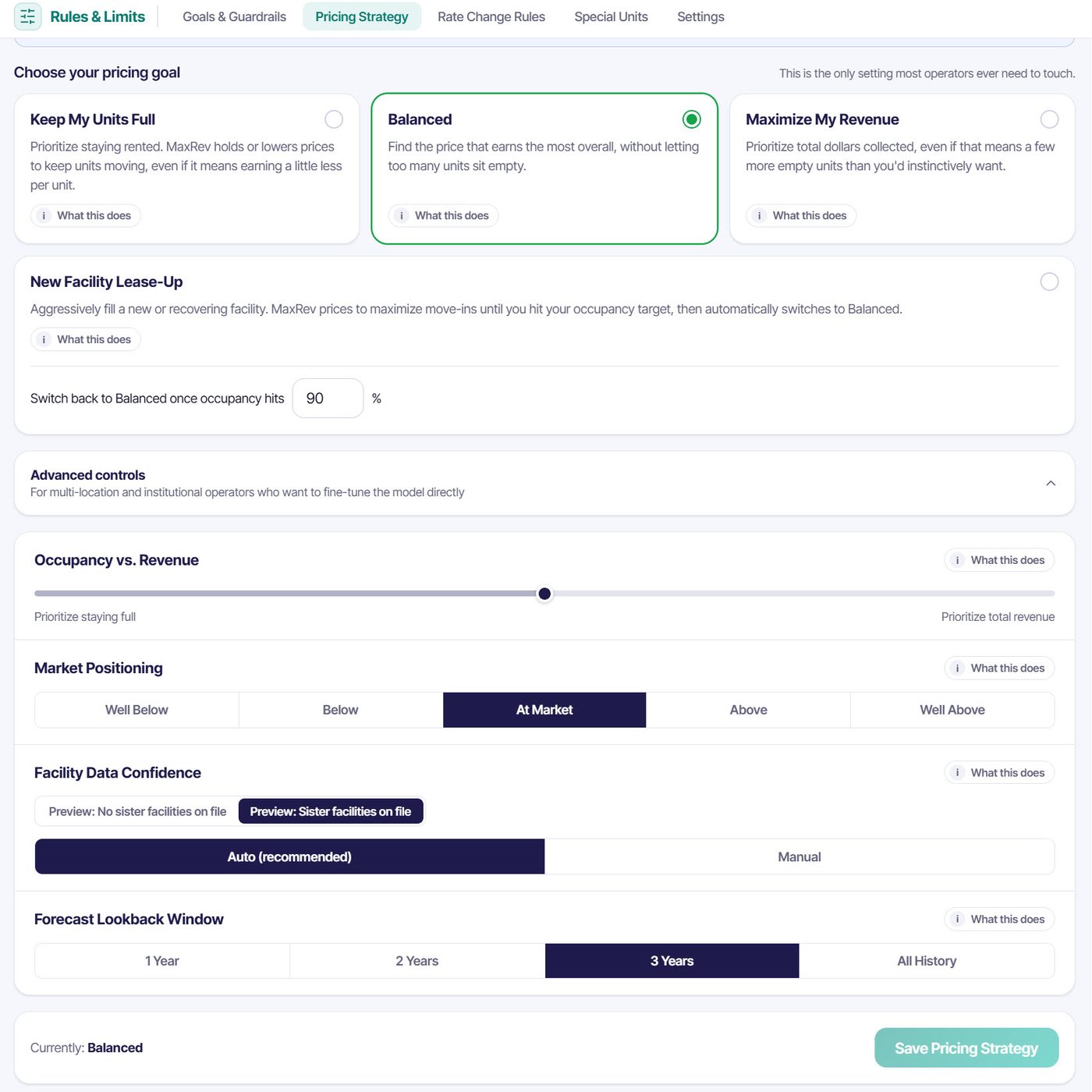
This is the only setting most operators ever need to touch.
Keep My Units Full
Prioritize staying rented. MaxRev holds or lowers prices to keep Units moving, even if that means earning a little less per Unit. A good fit for a slow season or when you need steady cash flow.
Balanced
Weigh occupancy and Revenue together, without leaning hard either way. This is the default and the right place to start for most Facilities.
Maximize My Revenue
Lean toward higher Revenue per Unit, accepting that more Units may sit empty. You choose it. It is never the default. A good fit when demand is strong and Units rent quickly.
New Facility Lease-Up
Aggressively fill a new or recovering Facility. MaxRev prices to maximize move-ins until you hit your occupancy target, then switches to Balanced automatically.
Lease-Up has an end point by design. You choose the occupancy at which pricing returns to Balanced, such as 90%. That keeps an aggressive fill-up strategy from becoming a permanent discount.
Advanced controls
For multi-location and institutional operators
Four controls let you tune the model directly. Most single-location owners never open them.
Occupancy versus Revenue
A slider between prioritizing staying full and prioritizing total Revenue. Each goal sets a default position, and you can move it to fine-tune the balance.
Market positioning
Choose Well Below, Below, At Market, Above or Well Above, relative to the competitors you track. This control requires the Market plan. On Core, pricing defaults to At Market without competitor data.
Facility data confidence
Automatic mode lets MaxRev decide how much to trust your own data versus benchmarks. Manual mode is available only when you have designated sister Facilities in Settings.
Forecast lookback window
Choose how much history the model learns from: 1 year, 2 years, 3 years or all history. A shorter window reacts faster. A longer window smooths unusual seasons.
Each control has a What this does explanation beside it, written in plain sentences, so a statistician and a store manager can read the same screen.
See MaxRev with your own Units and Rates
Book a short walkthrough and bring your Facility questions.
Data separation
Independent pricing, by design
Other operators' data never mixes with your market data. Every Rate is your decision.
Your own data
Your Rates, occupancy, tenants and history come from your management software and live in your account. They are never shown to another operator.
Market data on your competitors
The Rates you see for nearby competitors come from a market Rate feed, and they are stored in your account so you can compare against them.
A wall between the two
If a competitor of yours is also a MaxRev customer, the data from that operator's management software is never mixed into the market data you see for that Facility. You see only what the market feed shows for it.
Anonymized benchmark
Where your own history is thin, MaxRev can lean on an anonymized, aggregated benchmark. It is automatic. No operator can see it, select it or adjust it, and no individual operator can be identified from it.
Sister Facilities only
Manual blending is available only between Facilities you designate as your own sister sites in Settings.
Every Rate is your decision
You see your own data and public market Rates, and you approve or automate each Rate inside your own guardrails. This is how the product is designed. It is not legal advice, so talk to your counsel about your own pricing practices.
After the goal
Guardrails always have the last word
Your limits apply to every recommendation before you see it.
The model suggests a Rate. Your guardrails decide whether it is allowed. A floor and ceiling per Unit size, a cap on how much a Rate may move in one step and any Rate change rules or special Unit rules all apply before a suggestion reaches your queue.
That order means you can be ambitious with the goal and cautious with the limits at the same time. If a suggestion would break a limit, it is held to the limit and the Rate Watch record shows the guardrail that applied.
An example
What a goal change looks like
An illustration of how the same Unit can be treated under different models.
Imagine a 10x10 climate Unit at a Facility that is 92% occupied with Rates slightly under the market. Under Keep My Units Full, MaxRev holds the Rate or trims it, because the Facility is already full and the goal is to stay that way. Under Balanced, it suggests a modest increase, because strong occupancy and a gap to the market support one. Under Maximize My Revenue, it suggests a larger increase and accepts that a Unit or two may sit empty longer.
The numbers above are illustrative. Your own history, your competitors and your guardrails determine real suggestions.
Pick a plan to match your data
Market positioning needs competitor Rates, which come with the Market plan.
See plansBook a Demo